Web workspace
Read, organize, and edit artifacts. Review tasks and work history.
Open a document, diagram, presentation, or dataset in your browser and change it, so you don’t have to describe your own edits back to the agent.
One feature, from the discovery call to a branch. Two of the edits are yours.
Real ctlsurf views of a sample project. The conversation beside them is illustrated.Real ctlsurf views, sample project. Enlarge ↗
One project holds the brief, the current draft, and what comes next. Your connected agent reads the same material when you ask it to continue.
Explore the workspaceGoals and constraints
You rewrote the recommendation
What to do after the pilot
Your note stays with the project.
Start small. Review the pilot before a wider rollout.
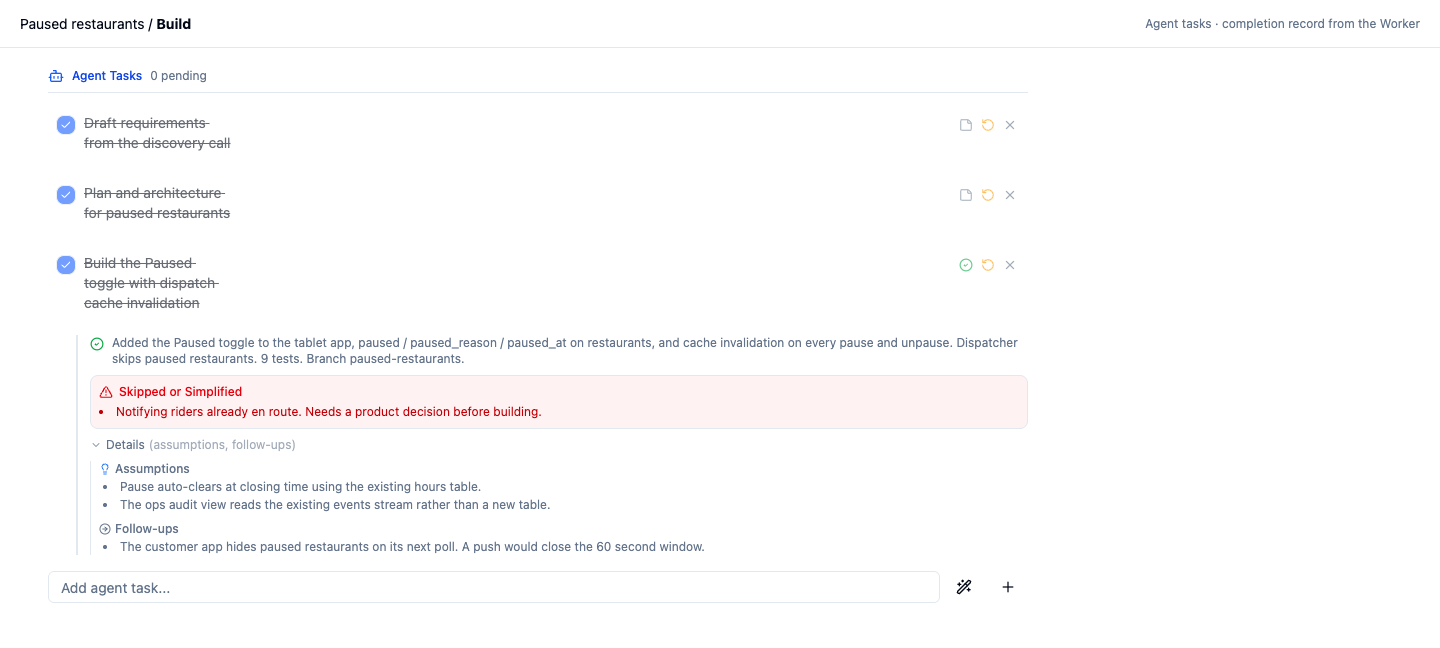
A Worker runs your installed coding agent in a terminal on a machine you control. Stream that session to the browser, type into it, and send it project work. When a task closes, the record says what the agent assumed and what it left alone.
Explore WorkerChanged three slides and the pilot checklist to the two-week window.
Week one starts on a Monday. The brief gave no date.
The budget table, which needs finance sign-off first.
Illustrative record. Completion records carry a summary, the assumptions made, and the work skipped.
A short film about the part of the work you never see: an agent arriving with nothing, finding the page, and finding you already in it.
Captions are part of the picture. An AI agent wakes in an empty room with one task, builds something that breaks in the same place, and follows its own handwriting into an archive of pages. It finds a page from last night and remembers. A person has read its reasoning and answered in red in the margins; the agent answers back, they build from both, and the agent writes down what it did before it goes.
Each surface reads and writes the same projects, pages, tasks, and permissions.
Read, organize, and edit artifacts. Review tasks and work history.
Gives a compatible external agent structured read and write tools for the workspace.
Runs coding agents in a local or headless terminal. Watch and interact with the session remotely.
Answers questions about workspace content and proposes page changes for review. Enabled, eligible Business organizations.
Keep reading, add context, edit supported content, and review work away from the desk.
Live help during a conversation, with meeting follow-ups saved back into projects.
Today’s priorities and ticket capture from the macOS menu bar.
Sign in and the command arrives with your API key already in it. Run it once; the installer finds Claude Code, Cursor, Codex, or Copilot on your machine and connects them.
Get my personal commandcurl -fsSL https://app.ctlsurf.com/install.sh | bashcurl -fsSL \
https://app.ctlsurf.com/install.sh \
| bashThis one prompts you for the API key and server by hand.
macOS / Linux · Restart your agent, then initialize a project. Setup guide ↗
For trying it on one project.
The full workspace, smaller limits
For running several projects at once.
Introductory price
For a team sharing one workspace.
Assign seats to your team
Your agent’s own subscription and provider costs are billed separately. The built-in assistant requires an enabled, eligible Business organization.
Documents, structured presentations, diagrams, tables, and working records. Edit supported content in your browser, then ask your connected agent to read those saved changes and continue. Presentations support PowerPoint export.
For the workflow shown above, connect a compatible external agent through MCP. Your setup command configures supported tools. The built-in assistant can answer questions and propose supported page changes for review; it requires an enabled, eligible Business organization.
Save useful notes, decisions, and results in your project, and configure your agent to consult them. Later sessions can read the same saved material. Continuity depends on what you record and what the agent reads.
A Worker is a terminal on a machine you control, running the coding agent you already have installed. From the browser you can watch that session, type into it, send it work, and read back what it did, including the assumptions it made and the steps it skipped. Creating a task does not by itself start an agent; that depends on how you have wired up your workflow. Explore Worker.
The mobile app supports project reading, notes, and task review; distribution varies. Sidekick and Bumpbar are coming soon. Sidekick brings conversations and reviewed follow-ups into projects. Bumpbar keeps daily project tickets in the macOS menu bar.
Projects and pages use access permissions. Share selected work with collaborators and manage organization roles. See our privacy policy for how account and workspace data are handled.